Introduction to Python#
This is not a thorough introduction to Python, but rather a brief overview of the key concepts you need to know to get started with this course.
1. What is Python?#
When people say Python, they can mean two things:
The Programming Language: a way that allows us to write instructions that a computer can understand and carry out based on specific rules and syntax.
The Interpreter: the actual program (also called
Python) installed on your computer that is able to read the instructions and execute them.
Note
Analogy: Think of the Programming Language rules and syntax as the grammar and vocabulary we use to write a pizza recipe, and the Interpreter as the cook who reads, understands, and executes the instructions to make a wonderful pizza.
2. Python Versions#
Python itself evolves over time and comes in different versions (for example Python 3.10, Python 3.11, Python 3.12, …): newer versions bring new features and improvements, while older ones gradually stop being supported.
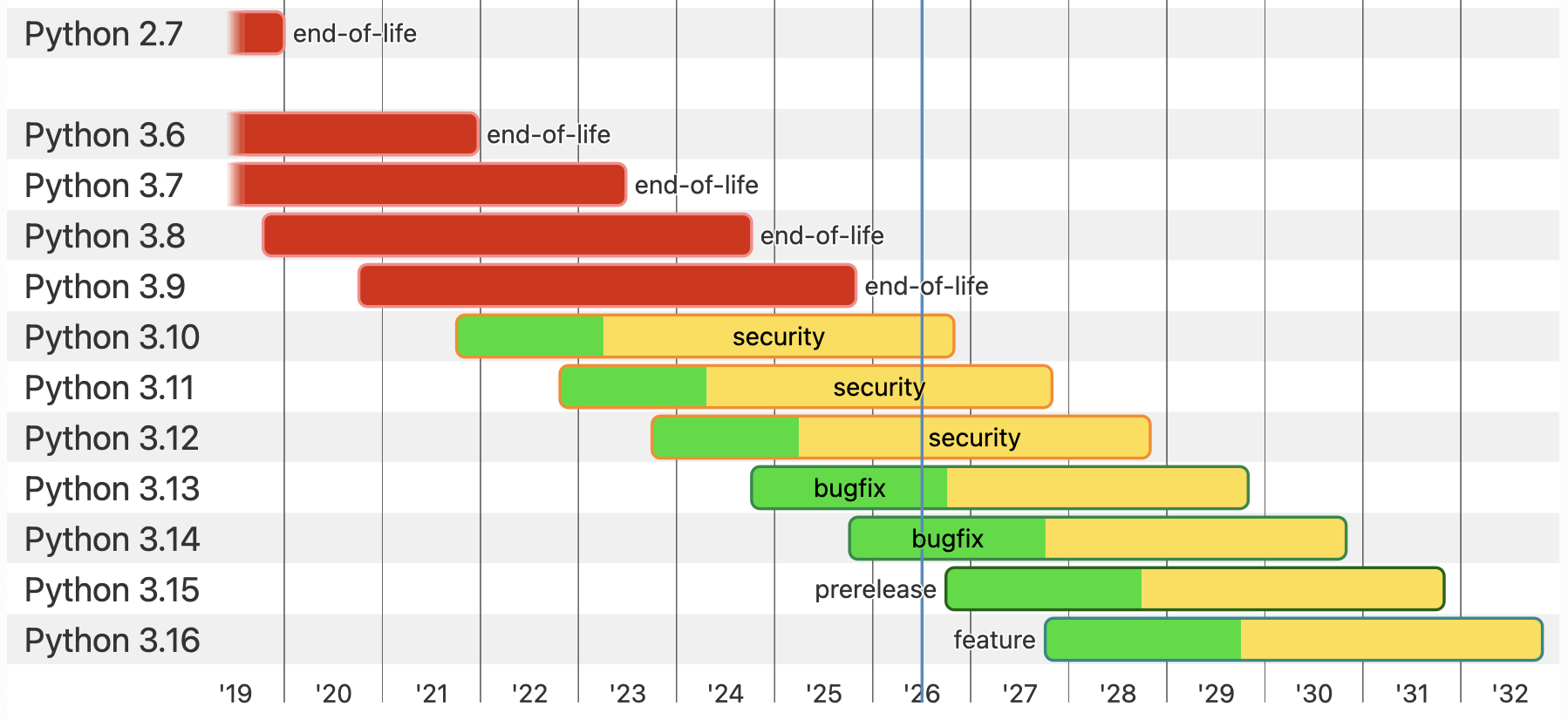
Fig. 1 from python.org#
This means that not everything works with every version: some code may only run with a specific version of Python, while another project might need a newer one. It is therefore useful to be able to choose which version of Python to use for each project, and, as we will see, there are tools that make this very easy.
3. Python Packages#
On its own, Python can already do a lot: it can do calculations, work with text, read and write different file types, repeat tasks, and much more.
These capabilities are organized into packages (also referred to as libraries or dependencies). A package is simply a collection of Python code grouped together to provide a specific set of functionality.
Some packages are already included with Python and are available by default, without you having to do anything. Together they form what is called the standard library (for example, Python already comes with packages to work with .csv files, dates, or the file system).
However, the real power of Python comes from the hundreds of thousands of additional packages written by people all around the world, which are not included by default and must be installed before you can use them. Instead of writing everything from scratch, you can simply install one of these packages and immediately reuse all the functionality it provides.
For example, in this course we will use packages to:
read images (e.g.
tifffile,bffile)manipulate images and perform numerical calculations efficiently (e.g.
numpy,scikit-image)use deep learning models (e.g.
cellpose,spotiflow)create plots and visualizations (e.g.
matplotlib,ndv)
Each of these tasks would take an enormous amount of work to build ourselves, but thanks to packages we can simply reuse code that experts have already written, tested, and shared.
Note
Analogy: To put the mozzarella (the package) on our pizza, we don’t have to buy a cow, milk it, and make the cheese ourselves. We can simply get mozzarella that someone else has already made beautifully for us. Sure, we could try to make it from scratch (i.e. write the code ourselves), but it can be quite hard and time-consuming. Packages are exactly that: ready-made ingredients we can reuse instead of preparing everything from scratch.
Most of these installable packages are published on a central repository called the Python Package Index (PyPI), from which they can be downloaded and installed.
Note
📦 Other repositories: PyPI is probably the most common place packages come from, but it is not the only one. In scientific programming you might also come across conda-forge, which is another place where packages can be stored for download and installation.
4. Virtual Environments#
Once we start installing packages, a new problem appears. Imagine you are working on two different projects at the same time:
Project A needs version 1.0 of a package.
Project B needs version 2.0 of that same package.
If all packages were installed in one single shared place on your computer, these two requirements would conflict with each other: installing the version needed for Project B would break Project A.
To avoid this, we use virtual environments.
A virtual environment is an isolated workspace (imagine a folder on your computer) that contains its own packages and its own Python, completely separate from everything else on your computer. Each project gets its own environment, so the packages of one project can never interfere with the packages of another.
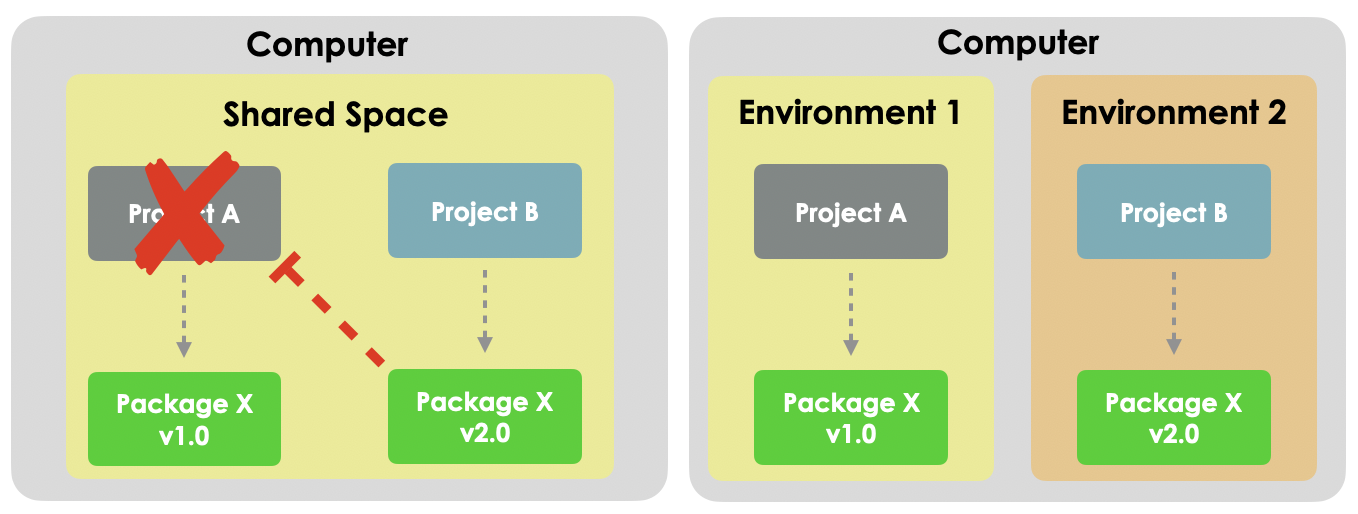
Since each environment contains its own Python, virtual environments also solve the version problem we saw earlier: every project can use exactly the version of Python it needs (e.g. Project A can use Python 3.10 while Project B uses Python 3.12), again without any conflict.
Note
Analogy: Imagine a kitchen that prepares pizza and hot dogs (Project A and Project B). Pizza needs tomato sauce, while hot dogs need ketchup (two different packages). If both recipes shared the same kitchen space, the sauces could get mixed up, and you might end up with ketchup on a pizza 😱! This does not work! By giving each recipe its own dedicated space in the kitchen (virtual environment), the ingredients of one do not mix with the ingredients of the other.
A key idea is that virtual environments are disposable. An environment is not precious: if something goes wrong, or you no longer need a project, you can simply delete the environment and recreate it from scratch, without affecting Python itself or any of your other projects. This makes experimenting safe, you can always throw an environment away and start fresh.
5. Putting It All Together with uv#
So far we have introduced three things we need to manage:
Python versions, the specific version of
Pythoneach project uses.Packages, the libraries (or dependencies) our code depends on.
Virtual environments, the isolated and disposable workspaces that hold both, one per project.
How do we handle all of this easily? With a single tool called uv!
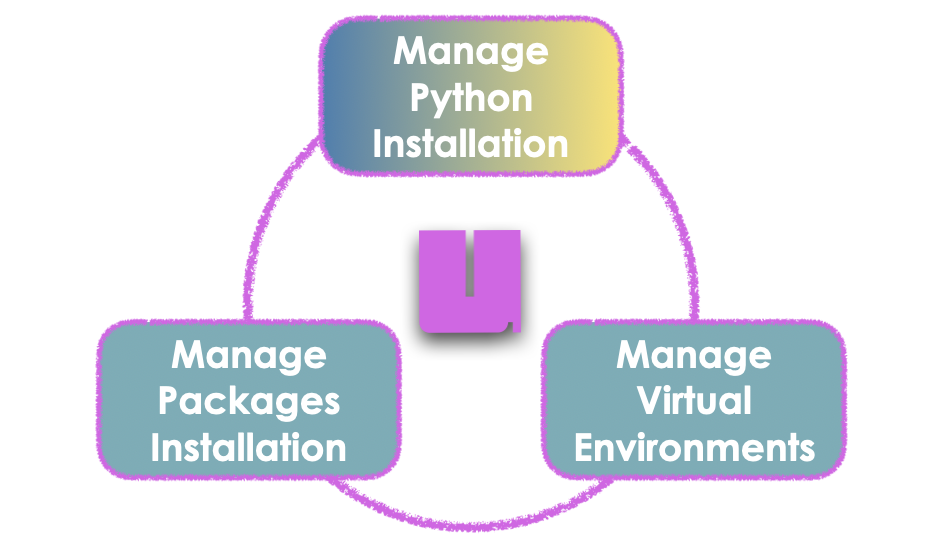
uv is a modern, extremely fast tool that takes care of everything we just described. Instead of learning many different tools, you only have to learn one. With uv you can:
download and install any version of
Pythonyou need,install and manage packages in your project,
create and manage virtual environments automatically.
Note
🔧 Other tools: uv is not the only tool that can manage packages, virtual environments, and Python versions together. Other popular options include conda and pixi, which are also common in scientific computing. In this course we will use uv, but the concepts you learn here apply to these other tools as well.
Note
💡 NOTE: In principle, you can download Python directly from the official Python website, and it will be installed system-wide on your computer (called the base environment). However, this is not ideal: installing packages directly into that system Python can quickly become messy and lead to the conflicts we described above. By letting uv manage the Python versions, the environments, and the packages for us, we keep everything clean, reproducible, and easy to throw away and recreate.
6. What’s Next?#
To learn how to use the code provided in this course, you can look at the Jupyter Notebooks and Juv section.
To then learn how uv manages your Python environments and packages, check out the Getting Started with uv section.
Note
💡 NOTE: For a more in-depth introduction to Python, check out the BoBiAC 2025 intro by Talley Lambert.